


Firefox added a new AI controls section to its desktop browser, allowing users to block or manage generative AI features in one place.
The controls were announced on February 2, 2026, and are scheduled to roll out with Firefox 148 starting February 24, according to Mozilla.
The AI controls appeared in browser settings and allowed users to disable all current and future AI-powered features through a single “Block AI enhancements” toggle.
Users could also manage individual AI features separately rather than enabling or disabling AI entirely.
At launch, the controllable features included translations, AI-generated alt text for images in PDFs, AI-enhanced tab grouping, link previews that summarized pages before opening, and a sidebar chatbot.
Firefox supported multiple chatbot providers, including Anthropic Claude, ChatGPT, Microsoft Copilot, Google Gemini, and Le Chat Mistral.
Mozilla said AI features remained optional and were turned off by default unless users chose otherwise.
Once configured, AI preferences persisted across browser updates. The company also said users could modify their settings at any time through the controls panel.
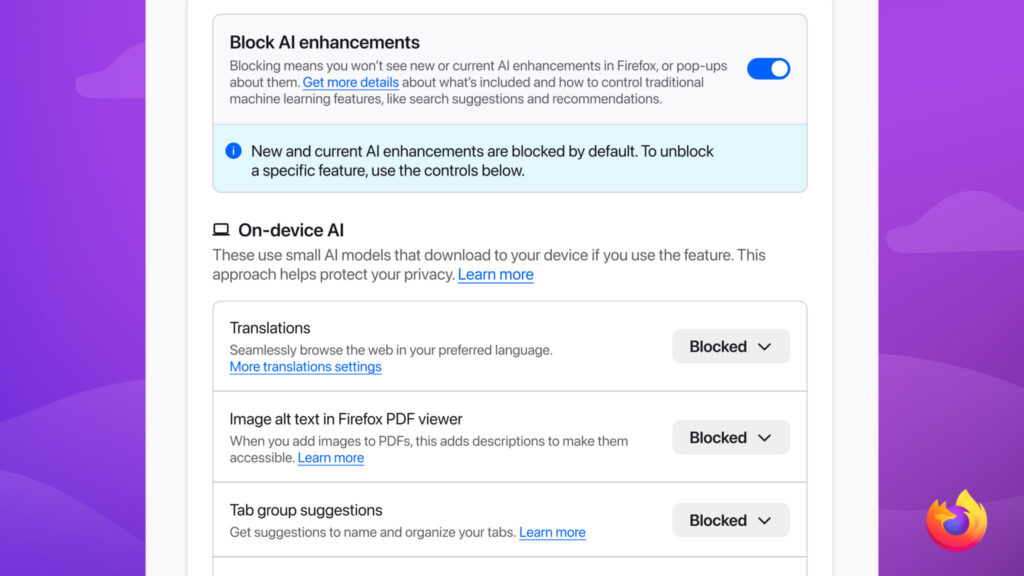
Image Credit: Mozilla
Why This Matters Today
You are seeing AI become increasingly embedded into everyday browsing tools, often with limited user control.
Many browsers add AI features incrementally, making it difficult to understand what is enabled or how data is being used.
Firefox’s approach centralized AI management into a single settings panel, reducing friction for users who want to opt out entirely.
By allowing AI features to be blocked at the browser level, Mozilla addressed concerns from users who prefer a traditional browsing experience without AI-driven enhancements or prompts.
At the same time, the controls supported selective adoption.
Users who found value in translations or accessibility features could enable those tools while disabling others. This reflected a broader shift toward configurable AI, where users choose specific capabilities rather than accepting bundled features.
The move also reinforced Mozilla’s long-standing emphasis on user agency.
As AI features expanded across browsers and search tools, clear opt-out mechanisms became more relevant.
Firefox’s AI controls signaled that user preference, not default enablement, would guide how AI was introduced into the browsing experience.
Our Key Takeaways:
Firefox added AI controls to give users centralized management over generative AI features in the browser.
The controls allowed full opt-out or selective feature use without repeated prompts.
Preferences persisted across updates, reducing friction for long-term users. The feature began rolling out with Firefox 148 in late February.
- Firefox 148 introduced a dedicated AI controls section in desktop browser settings.
- Users could block all AI enhancements or manage features like translations, tab grouping, and chatbots individually.
- The controls reflected a broader push to give users explicit choice over AI in everyday browsing tools.
You may also want to check out some of our other tech news updates.
Wanna know what’s trending online every day? Subscribe to Vavoza Insider to access the latest business and marketing insights, news, and trends daily with unmatched speed and conciseness. 🗞️