

In business, perception matters. How your target audience, leads, and customers perceive your business or brand influences their opinion and interaction with your company.
Needless to say, you want people to think highly of your brand! You want your leads to feel good about doing business with you, and you want your customers to enjoy engaging with your business continually.
First impressions are extremely important. If your target audience decides that your brand is non-credible, it becomes very difficult to change their minds.
People tend to be biased toward trusting bigger and “more established” brands. Oftentimes, all it takes to lose a potential customer is a quick Google search of your brand, a review of your social media pages, or a quick glance at your YouTube channel.
Why? Unfortunately, most consumers are lazy, so to speak, and prefer making easy decisions. It’s easy to assume that a brand with fewer YouTube subscribers and views is less credible than one with millions of subscribers and views, even though oftentimes, that is not the case.
Most people follow the crowd, and if your YouTube channel doesn’t have a large enough crowd for them to join and follow, they are likely to move on to the next channel and follow another brand’s crowd.
Now, not every company focuses on building their social media pages or YouTube channel, and that’s okay. Countless multimillion-dollar brands have no online presence whatsoever, but, for instance, have thousands or millions of email subscribers.
- For instance, we have never prioritized building our social media channels here at Vavoza, but we run a highly profitable agency. Our newsletter was also profitable from the get-go, thanks to marketing strategies that do not require having an online presence for credibility.
To gain credibility, we crafted strategic collaborations with our clients who have large communities in a similar niche to ours. We generate millions of dollars in revenue for our clients by offering them strategy consultations and managing their marketing campaigns, so they gladly recommend us as a valuable resource to their communities.
However, if you are building your business from scratch and don’t have any well-established win-win relationships yet, it would be wise of you to use every advantage to gain traction and credibility in the crowded and “lazy” cold market.
So, what is the solution to this major challenge you might face as a new brand?
There are many ways to influence the perception of your target audience, and our three-part branding series shared a few powerful ideas on this topic.
One of the most effective ways to boost your brand’s credibility is to put out high-quality and value-focused content on YouTube and get many people to interact with it as quickly as possible.
Today, we will share a specific YouTube advertising tactic (that we have implemented numerous times for our clients in the past) to influence your target audience’s perception, boost your brand’s credibility, increase your YouTube channel views and subscribers, and nurture a targeted audience that you can tap into later.
In the following sections, we will share exactly how to launch an efficient and effective Cost-Per-View (CPV) ad campaign in Google Ads to boost your organic YouTube videos.

Getting Started
Let’s dig into the meat and potatoes! We will get technical today, so please take your time and follow our guide at your own pace.
First things first, you must have a YouTube Channel up and running and video content ready to post; otherwise, you cannot implement this tactic. Also, if you have not used Google Ads yet, create an account here.
Next, in your Google Ads account, go to Tools and Settings > Setup > Data Manager and link your YouTube channel to your Google Ads account.
- These settings might vary depending on your Google Ads account interface, but the point is to connect your YouTube channel to your Google Ads account.
And now, let’s move on to the more important aspects of successfully implementing this tactic.
Determine Your Objectives
Your primary focus of this particular campaign is to influence perception and gain credibility in the marketplace, but who said you cannot kill two birds with one stone?
- Your first objective is to build a strong foundation for organic growth and boost your brand’s credibility by boosting your organic YouTube videos to gain views, engagements, and subscribers. Thus, increasing the odds of your target audience taking your brand more seriously once they search for and discover it organically.
- Your second objective is to capture your targeted video viewers and build a user-based audience in your Google Ads account so that you can nurture them. Then, you can target them with paid ads to convert them into hot leads and buyers.
When implemented correctly, this tactic positions you to generate high-quality leads and get high conversion rates in the future (more on this below).
Build Your Target Audience
You know your objectives, and now, it’s time for some technical work!
Each YouTube video that you choose to boost must have its own unique audience that is hyper-relevant to the content in the video.
For example, if your video talks about “how to launch an affiliate marketing business in 2024,” you must create a custom audience targeting people who are specifically interested in launching an affiliate marketing business.
How to create a hyper-targeted custom audience:
The title of your YouTube video should include the primary keyword you want to target.
For example, if your video talks about “how to launch an affiliate marketing business in 2024,” then make sure to include “How To Launch An Affiliate Marketing Business In 2024” in the video’s title and description.
This is important for organic SEO and paid ad relevance.
Create a list of targeted long-tail keywords that you mention in your YouTube video. You will need one primary long-tail keyword to target (the same one that is in your video’s title) and relevant secondary keywords to layer on top of your primary keyword to ensure you get a hyper-targeted audience viewing your video.
For example, if your primary keyword is:
how to launch an affiliate marketing business in 2024
Some of your secondary keywords can be the following:
how to start an affiliate marketing business
how to start affiliate marketing for beginners
how to start affiliate marketing programs for beginners
Your primary and secondary keywords must be highly relevant to the content in your video.
Once you have a list of keywords that you want to target, it’s time for the FIRST step of creating your targeted audience in Google Ads:
- In your Google Ads account, go to Tools and Settings > Shared Library > Audience Manager > Custom Segments.
- Click the + icon to create a new custom audience segment.
- Going with the example above, you would name your audience “How To Launch An Affiliate Marketing Business In 2024,” and you would add only your primary keyword to this audience.
- Select the option “People with any of these interests or purchase intentions” for this audience, and click “Save” to create your custom audience.
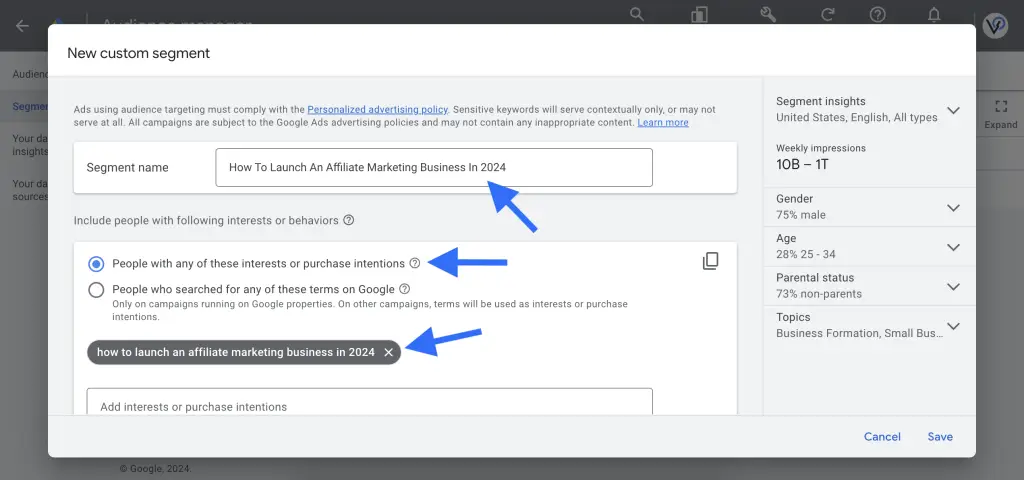
This completes the initial step of creating your targeted audience.
The next part of building your audience is done during the actual launch of your ad campaign.
Next, we’ll tell you what to do next to ensure you get a hyper-targeted audience viewing your ads – and that’s where your secondary keywords will come in handy.
YouTube CPV Ad Campaign Launch Guide
Ready? Get set. Launch! In this section, we will guide you step-by-step on how to launch your YouTube CPV ad campaign.
By the way, your Google Ads interface might look different than what you see in our guide because Google likes to roll out and test different interfaces and features in different Google Ads accounts. Consider switching your account view to “Expert Mode” and the “previous design.”
Regardless of how your interface looks, you should be able to follow along and launch your campaign successfully by implementing the concepts we share in this guide, especially if you do what we recommend next.
This is important:
Before you do anything with Google Ads, please click around your ads account and familiarize yourself with the platform and its features. If you are new to paid advertising, please spend time studying the platform and getting comfortable navigating around your account.
The good news is that once you conceptually understand how one ad platform works, you will be able to use any other ad platform with ease because, conceptually, they are all very similar.
Step 1: Ad Campaign Creation
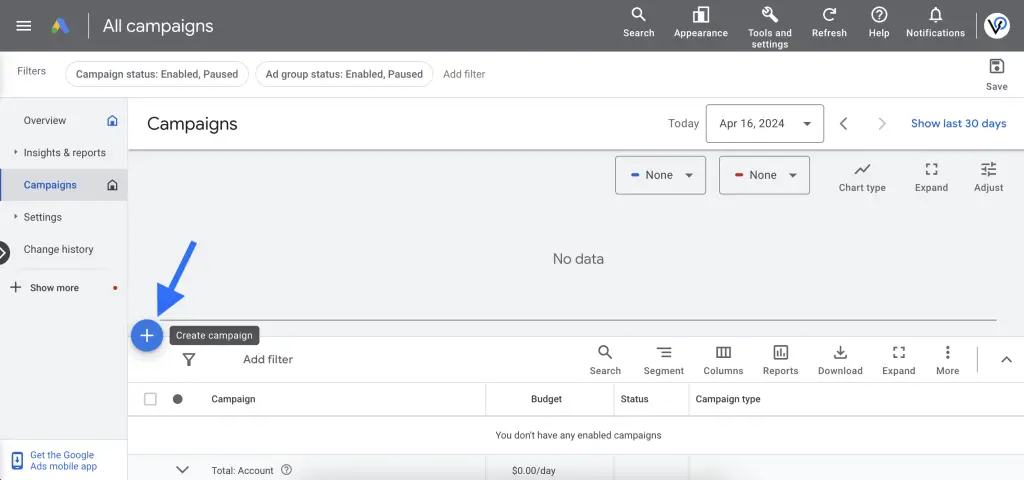
Let’s get started! In your Google Ads account, go to the campaign view and click on the blue + icon to create a new campaign.
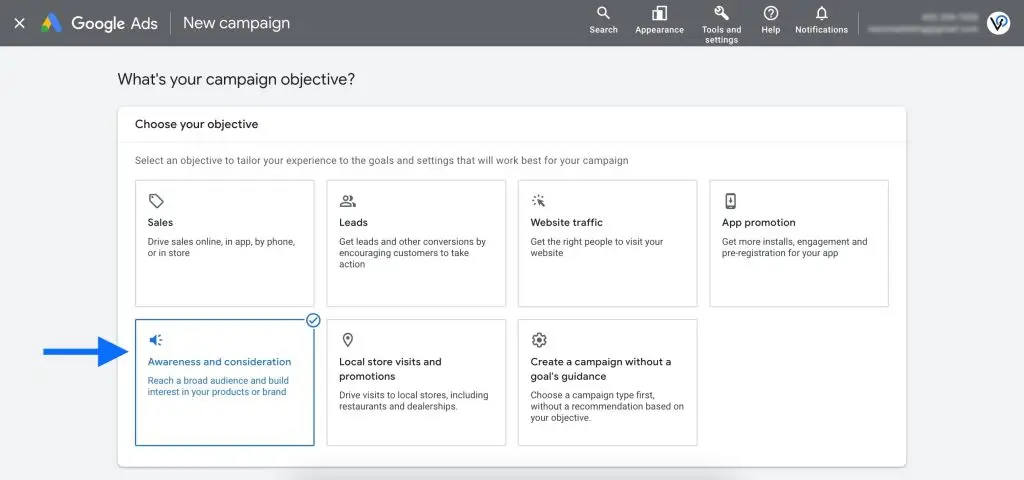
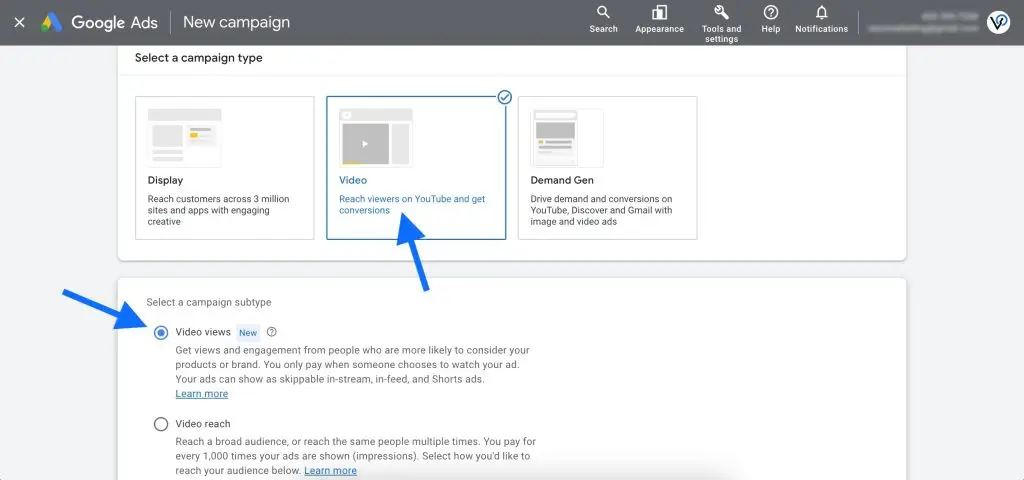
Select Awareness and consideration as your campaign objective.
For your campaign type, select Video, and for the campaign subtype, select Video views.
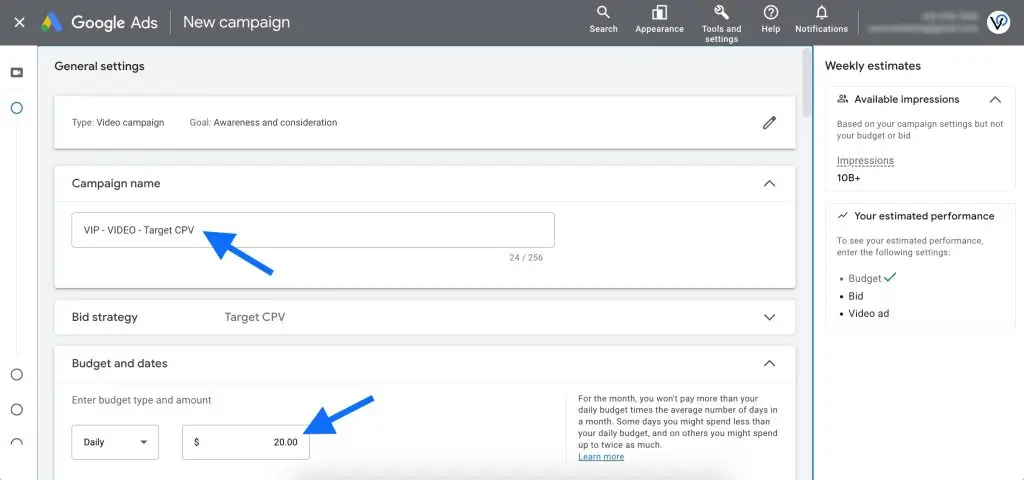
Give your campaign a name of your choice. And for the budget, set the amount you want to spend daily or in total on this campaign. We set our demo campaign to spend $20 per day.
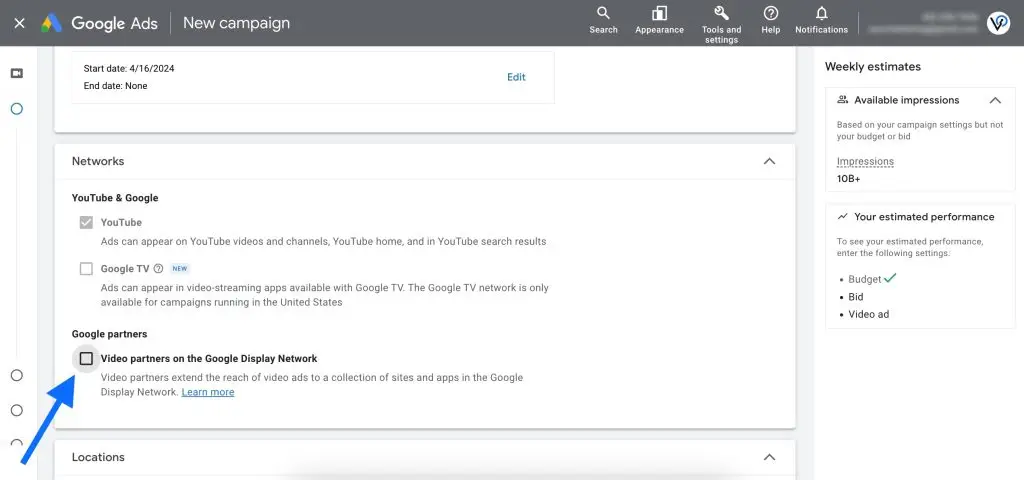
Under Networks, UNCHECK the box next to Video partners on the Google Display Network. For this campaign, we want to get views on YouTube only.
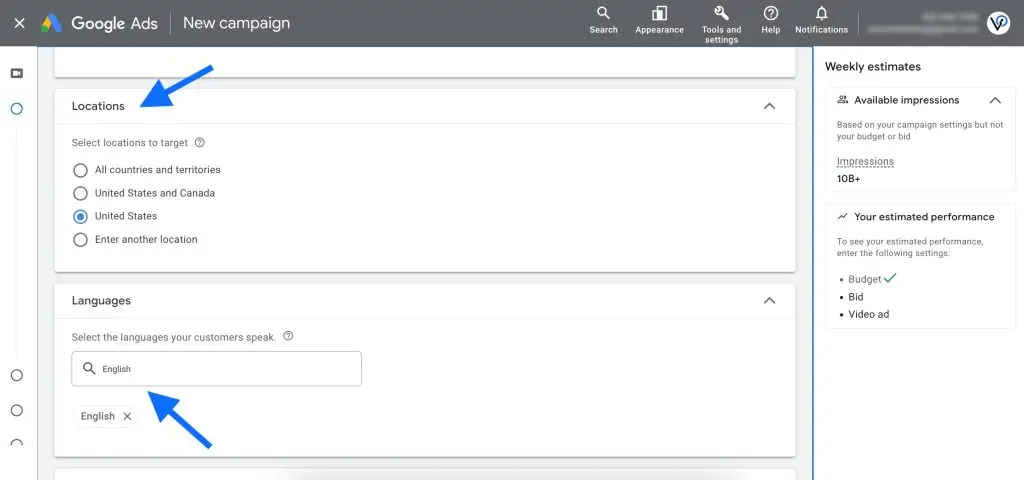
Select your target location(s) and the language your target audience speaks. For our demo, we chose the United States and English.
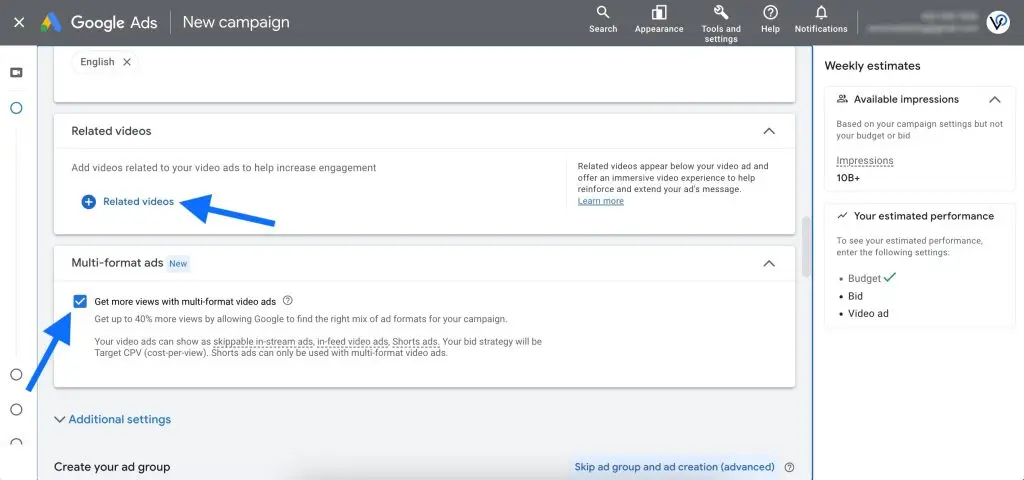
If you have additional videos that are similar to the one you are boosting, add them in the Related videos section. That way, when your target audience views your video, they will have an option to view more videos from your channel, which keeps them more engaged and boosts your views.
Leave Multi-format ads enabled to maximize efficient views.
Step 2: Ad Group Creation
Next, it’s time to create an ad group within your campaign. You can save your campaign and skip this part if you want to do it later, or you can create your ad group during the campaign launch. We will proceed to create an ad group.
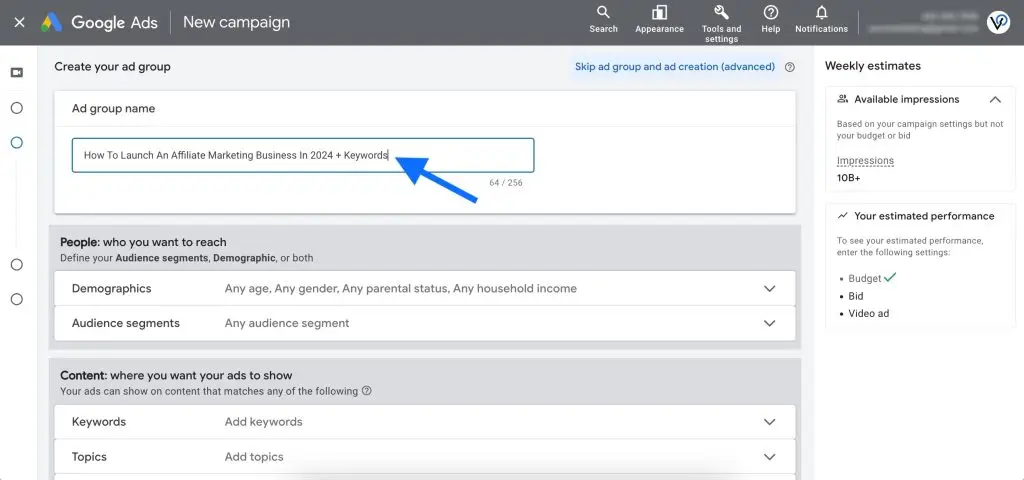
Give your ad group a name in the following format: Name of the audience you created earlier + Keywords.
In our example, our audience is called “How To Launch An Affiliate Marketing Business In 2024,” so we will name our ad group “How To Launch An Affiliate Marketing Business In 2024 + Keywords”
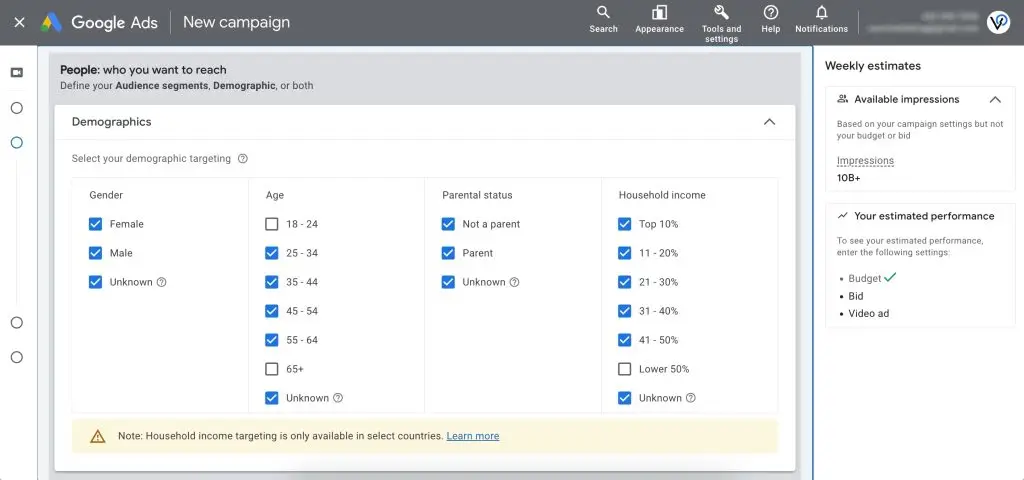
Select your target demographics. Choose the appropriate genders, ages, parental status, and household income of your target audience.
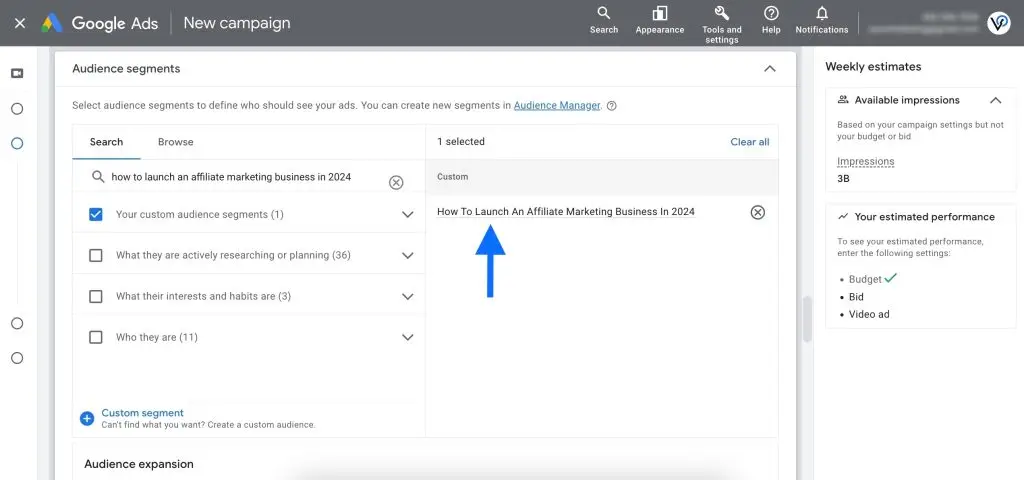
Under Audience segments, find and select the custom audience you created earlier. We selected the audience we created, which was How To Launch An Affiliate Marketing Business In 2024.
Make sure to UNCHECK the box under Audience expansion to avoid targeting an overly broad and non-targeted audience.
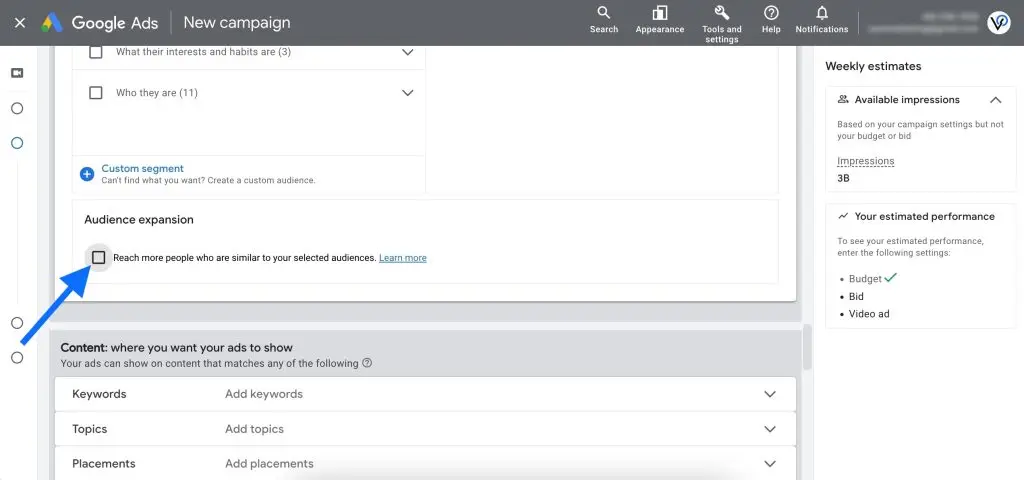
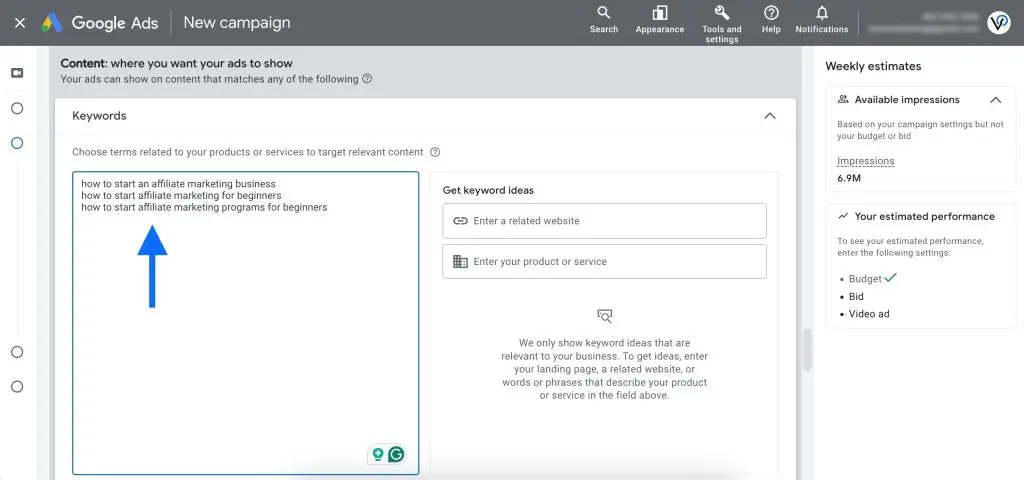
Next, add the relevant secondary keywords you put on your list earlier in this guide. The secondary keywords we chose for our audience earlier were the following:
how to start an affiliate marketing business
how to start affiliate marketing for beginners
how to start affiliate marketing programs for beginners
This completes the second step of creating your target audience. Layering keywords on top of your custom audience ensures the right people view your boosted YouTube video.
Step 3: Ad Creation
Finally, it’s time to create an ad out of the YouTube video you want to boost. You can save your campaign and ad group and skip this part if you want to do it later, or you can create your ad during the campaign launch.
We will proceed to create an ad.
Copy the link to the YouTube video you want to boost and paste it into Google Ads.
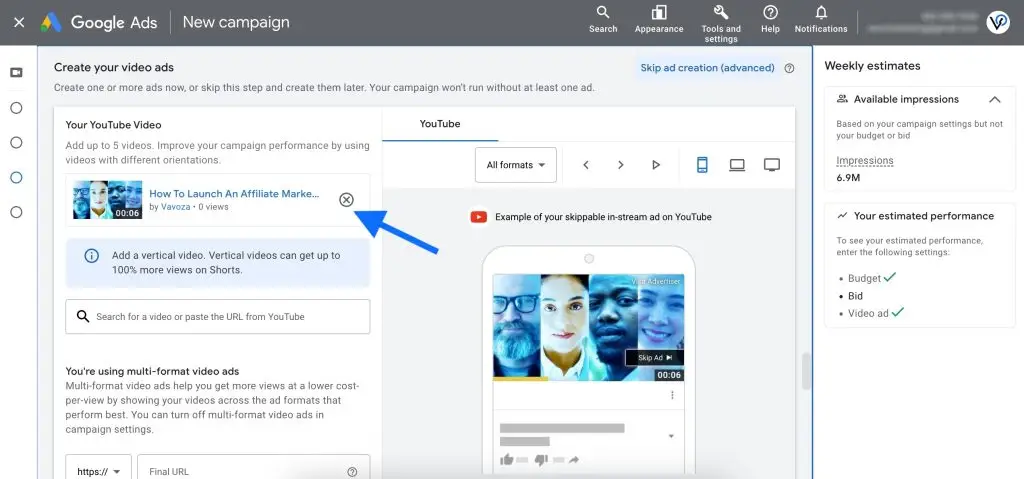
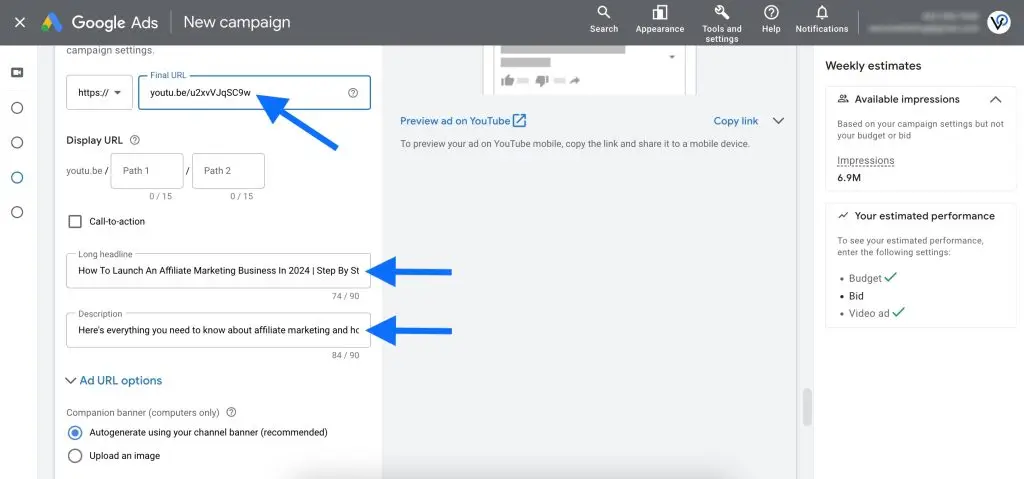
Since we are aiming to maximize video views, make the Final URL the same YouTube video link that you just pasted as an ad.
For the Long Headline, use your YouTube video’s title exactly as it appears on YouTube (hopefully, you followed our guide and included your primary keyword in the title).
The title of our demo YouTube video is How To Launch An Affiliate Marketing Business In 2024 | Step By Step Guide, so we used that as the Long Headline in our ad.
Add a Description that is relevant to the content in the video. In our example, we used the following description: Here’s everything you need to know about affiliate marketing and how to do it right!
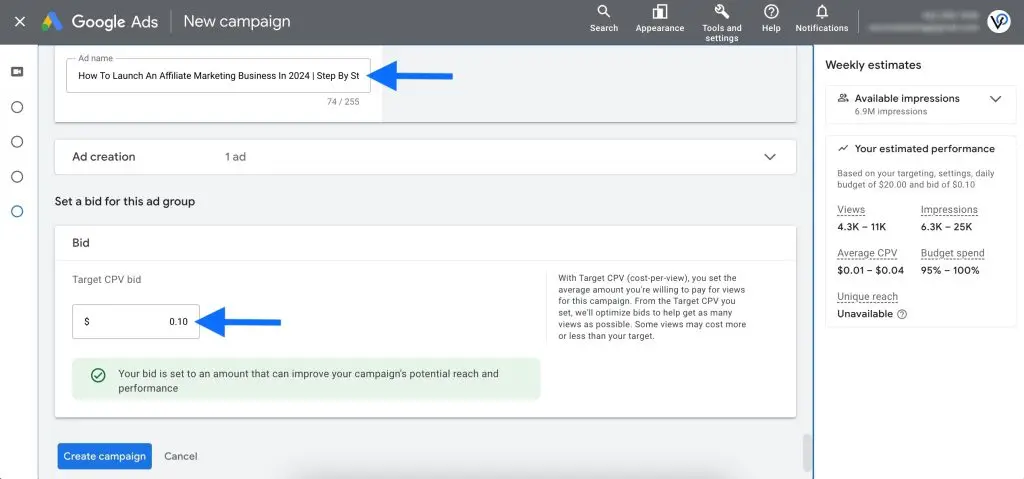
Give your ad a name. We used the title of our demo YouTube video as the ad name.
Last but not least, set your Target CPV bid. If you are boosting a video targeting the United States, start with a 5-10 cent bid, and adjust it accordingly as the campaign runs (more on this in the next section).
Click Create campaign, and your campaign will go live!
Final Steps
Once your campaign is live and your video is getting views, pay attention to the Avg. CPV and the daily spend of your campaign.
Adjust the “Columns” inside your Google Ads account to monitor any metrics that are important to you – you can create custom column sets as needed.
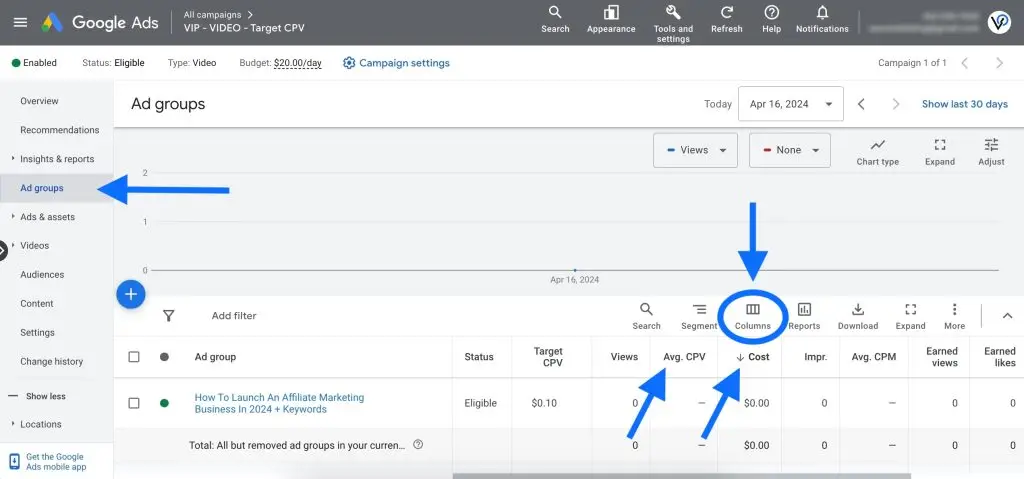
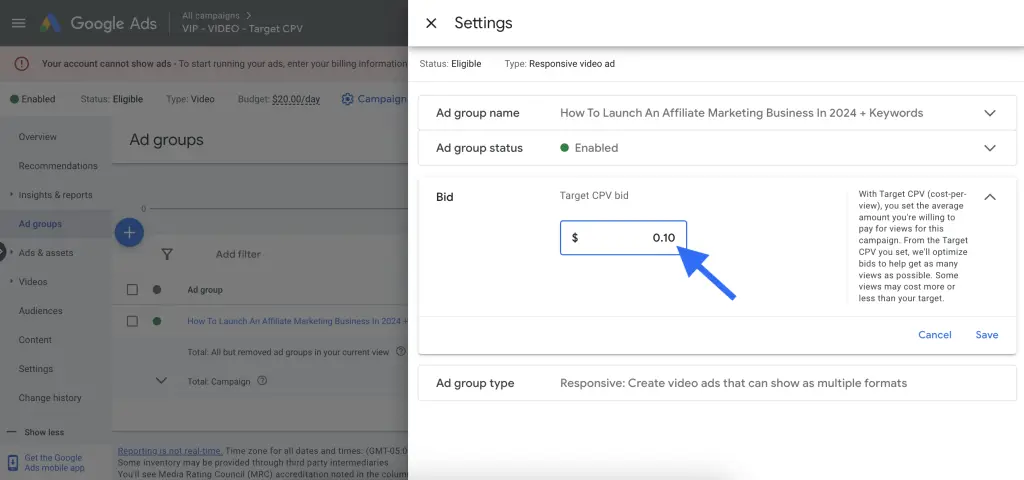
You can control your campaign’s daily spending by adjusting the campaign budget in its settings and the Target CPV bid in the ad group settings.
To get the most efficient views, lower your Target CPV bid as much as possible – as long as you are still able to get views at your set bid.
If your campaign stops serving your ads and delivering views, your bid is too low. If the campaign spends your budget quickly, then your bid is too high.
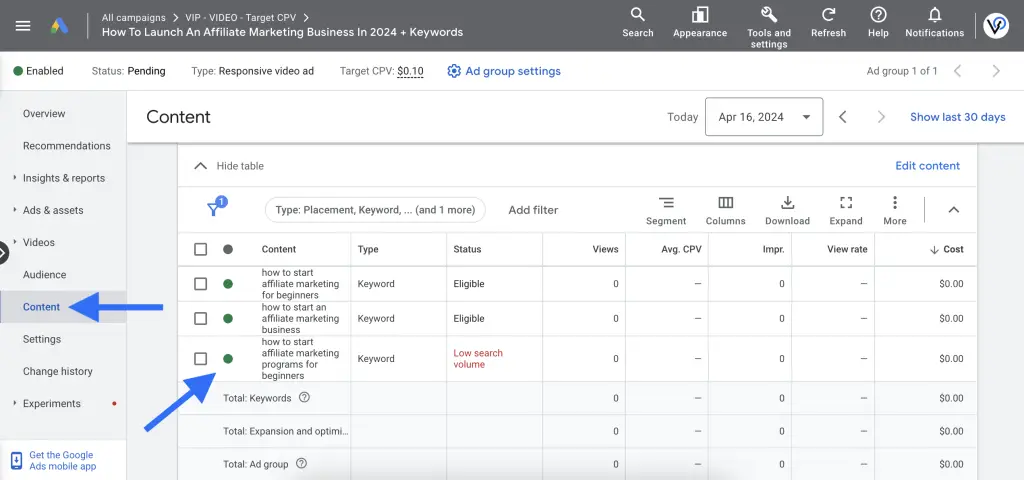
Also, monitor the secondary keywords you added as a targeting layer in your ad group to see which keywords are generating more or less efficient views (and how they impact any other metrics). Pause or remove keywords that don’t perform to your standards.
Future Planning: Creating A Custom Audience Segment For Retargeting
As your campaign runs and your YouTube video generates efficient views, you may want to capture your video viewers to target them with direct-response ads in the future.
You can also boost additional YouTube videos to your captured audience to nurture them and increase their likelihood of becoming your brand’s followers, leads, and customers.
Here’s how to create a custom data segment out of your YouTube video viewers:
- In your Google Ads account, go to Tools and Settings > Shared Library > Audience Manager > Your Data Segments.
- Click the + icon to create a new custom data segment, and select YouTube Users.
- Give your audience a name, such as “YouTube Video Viewers (Affiliate Marketing),” and select your YouTube channel.
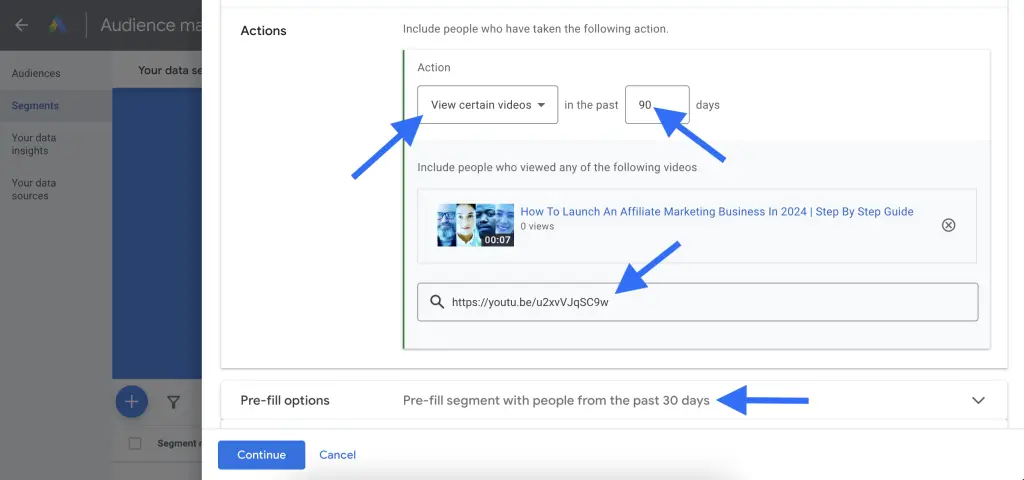
- In the Actions section, select Viewed Certain Videos, and specify how long you want your viewers to stay in the audience (90 days is a good start, but you can set it to as long as 540 days).
- Paste the YouTube video link to add your boosted YouTube video. You can add multiple relevant videos, but make sure all the videos you add are relevant to your target audience.
Closing Remarks
There you have it – the tactic to help you influence your target audience’s perception, boost your brand’s credibility, increase your YouTube channel views and subscribers, and nurture a targeted audience that you can tap into later – all at once!
The best part is that this tactic doesn’t require messing around with website code and tracking pixels – anyone can do this with minimal technical skills as long as they are willing to produce and post content that is worth watching on YouTube.
Remember, you can’t go wrong with posting high-quality and value-focused content and serving your target audience to the best of your ability.