


In this article, we analyze an interesting video content trend and provide a step-by-step implementation guide to help you capitalize on it.
The split-screen short-form video format has surged in popularity across YouTube and social media platforms.
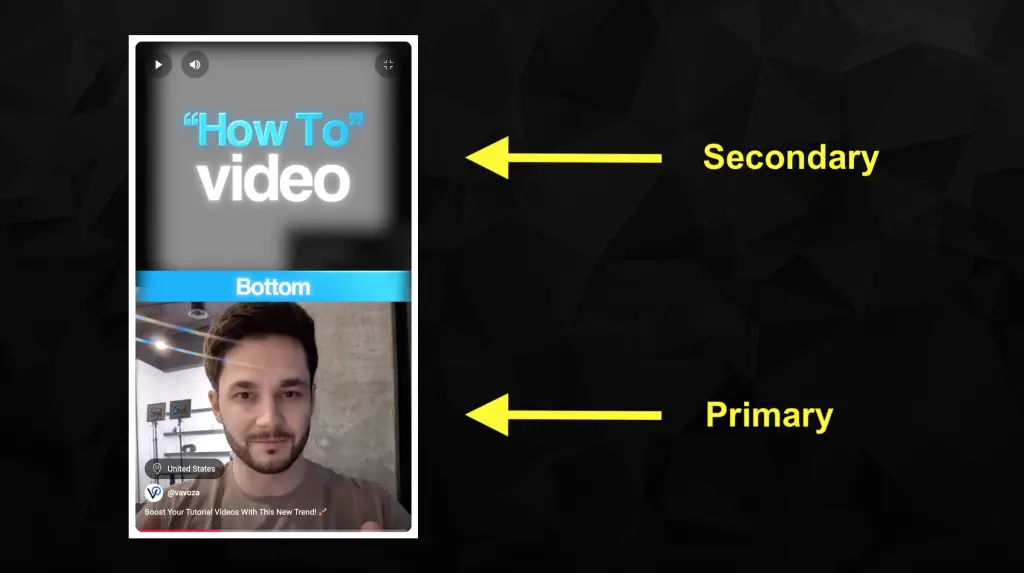
This trend involves creators dividing the screen to display two distinct video streams simultaneously.
These videos typically consist of original content paired with an unrelated, often mesmerizing or fast-paced video (like gameplay or “oddly satisfying” clips) on one side.
Another trendy style is split-screen tutorials, where the presenter is on one side and the demo occurs on the other. Vlad from Vavoza briefly explains this tutorial trend in this YouTube Short.

Why Are Split-Screen Videos Effective?
The rise of split-screen short-form videos can be attributed to several factors:
- Attention Economy: The dual-stimuli approach tends to capture and hold viewer interest longer. The secondary, often unrelated video, can act as a “hook” or a source of continuous visual engagement, potentially reducing scroll-away rates.
This taps into a behavior similar to “second screening.” According to various consumer behavior studies, roughly 85% of online users use another device (like a phone) while watching TV, often to engage with related content or social media. - Information Density: For tutorials or commentary, split-screens allow for showing both the speaker and the subject matter simultaneously (e.g., a software tutorial, a product demo, or a reaction).
This provides a richer, more integrated viewing experience, as seen in Vlad’s explanation of keeping the presenter in-frame alongside the tutorial content. - Engagement Tactic: The unrelated video in some split-screens can serve as a “stimulus” or “satisfying” visual that keeps eyes on the screen, even if the primary content is more informational or slower-paced. This tactic can boost watch time, a key metric for platform algorithms.
- Content Repurposing: The split-screen format allows for creative remixing of existing content (e.g., reacting to another video, duetting) or adding commentary to gameplay or other footage.
Supporting Data
While direct statistics on “split-screen” video engagement are still emerging, we can infer its effectiveness from broader social media video trends:
- Split-screen is particularly prevalent in short-form videos like TikToks, Instagram Reels, and YouTube Shorts. According to Sprout Social, short-form video is reported to deliver the highest ROI and is expected to secure more investment than any other format in 2025.
- According to various platforms’ performance stats, videos that grab attention in the first 3 seconds have a significantly higher average watch time, resulting in a larger reach. The dual nature of split-screen videos can contribute to the efficacy of the initial hook.
- According to Zebracat, Shorts that hold attention past the first 5 seconds have a 60% lower swiped-away rate than those that don’t. Split-screen videos tend to increase this percentage by offering more visual information or stimuli.
Now that we’ve established the facts, let’s get into the “meat and potatoes” and actually implement this trend; what do you say? 😎
Split-Screen Video Implementation Guide
Below is a concise, 5-step guide on producing split-screen video content (particularly short-form videos), which will help you capitalize on this trend. Let’s get right into it!
Step 1: Primary Video
What is the main message, story, or demonstration you want to convey? Are you creating an entertainment video, sharing quick tips, or a tutorial?
Determine your primary focus and objective, as they are key to your primary video panel (your primary video).
Prior to filming your primary video, do keyword research. Use the Google Ads Keyword Planner to find high-volume keywords that are related to your topic, and incorporate them into your script.
Then, create a script (or just wing it) and film your primary video with good lighting and clear audio.
Remember to encourage comments, likes, shares, and follows, or deliver another call to action – tell the viewer what you want them to do.
Step 2: Secondary Video
Decide on the secondary video type you will use to retain viewer attention or to deliver your visual presentation. Pick one of the following:
- Unrelated Stimulus: If using an unrelated video (e.g., gameplay, satisfying loops), choose content that is visually engaging but not so distracting that it completely overshadows your primary content.
- Complementary Content: For tutorials, reactions, or comparisons, the secondary panel should directly relate to and enhance the primary content (e.g., screen recording, the video you’re reacting to, or a product comparison).
You can use your own screen recordings or gameplay footage, or utilize royalty-free stock footage or clips from platforms that allow reuse, such as Envato, Pexels, or Pixabay (ensure you have the use rights to avoid copyright issues).
Step 3: Video Editing
You can outsource this step to a professional video editor (recommended). However, if you prefer doing it yourself, here are some quick video editing and formatting tips:
- Choose Your Editor: Modern and simple editors include CapCut, VEED, Kapwing, and Clipchamp.
- Video Layout: Decide on the split: Side-by-side (vertical split) or top-and-bottom (horizontal split). Also, ensure your aspect ratio is optimized for the target platform (e.g., portrait mode for Reels and Shorts).
- Positioning & Sizing: Place your two video clips onto separate tracks in your editor’s timeline. Then, resize and reposition each clip to fit its designated portion of the screen. You can crop or scale each video independently as needed.
- Audio Management: Decide which audio track is dominant. For example, you might have music on the secondary video and a voiceover on the primary, or vice versa. Adjust volume levels so they don’t clash. The secondary video’s audio is often muted or very low.
- Add Captions: As it is widely recognized, audio captions significantly boost engagement. Generate captions for your primary audio. Keep the fonts and colors congruent with your brand aesthetics.
- Pacing and Visual Interest: Keep cuts quick and visuals dynamic, especially for short-form platforms. Remember the 3-second rule for grabbing and retaining attention.
Step 4: Performance Optimization
If the platform allows, create a custom thumbnail that clearly indicates the split-screen nature. Currently, you can upload a custom thumbnail for Instagram Reels and TikToks, but not YouTube Shorts.
- Thumbnails are crucial for long-form YouTube videos. A compelling thumbnail significantly boosts a video’s click-through rate (CTR), resulting in more views and increased reach.
So, take notice when YouTube allows uploading a custom thumbnail for Shorts. 💡
This is also where your keyword research from Step 3 comes in handy. To improve discoverability, use your primary target keywords in your video title, description, and tags (or hashtags).
Step 5: Content Distribution
Analyze your channel’s or page’s analytics and determine the best time to post your video to maximize reach. Late morning, noon, and late afternoon hours are often the best times to reach broad audiences.
Schedule or post your trendy video.
Consider boosting your video to reach more targeted audiences, especially if it siphons viewers into your sales funnel.
- Contrary to popular belief among content marketers, boosting YouTube videos does not negatively impact their organic reach. 💡
If your video performs well, consider creating another version of it and reposting it. You can repurpose your existing primary video while using another secondary video, or vice versa (depending on the video type).
Be creative and find ways to maximize your video’s reach and engagement.
For instance, post it multiple times with alternative titles and thumbnails, send it to your email list, run it as a direct-response ad, post it on someone else’s website or channel as a contributor, etc.
After all, it’s your content, so do with it as you wish.

Closing Remarks
Today, we analyzed the split-screen short-form video trend and shared an actionable, step-by-step implementation guide.
We hope you will successfully capitalize on this trend soon while it’s still hot.
Want more actionable tips continually? Subscribe to Vavoza Insider to access the latest business and marketing insights, news, and trends daily with unmatched speed and conciseness. 🗞️